
Helping Admins Write Secure Code Faster with AI
How I helped cybersecurity admins write complex identity expressions easier, faster and safer with and without generative AI.

ROLE
Product Designer
Product
IBM Security Verify
MY PART
Design · Research · Content
OVERVIEW
Context
This case study covers introducing AI-assisted code generation into IBM Verify, an enterprise identity and access management platform. Verify relies on Common Expression Language (CEL) to define identity logic, attribute transformations, access policies, payload handling but CEL is difficult to write and maintain, especially for admins who aren't CEL experts.
The problem: AI creates a tension between speed and trust: a small mistake can break authentication or open a security gap, and admins stay accountable for whatever logic ships — so blind automation isn't an option.
The challenge: Explore how natural-language prompting could help admins create CEL scripts faster — without stepping outside the constraints of an enterprise security system.
PAERT 01 - MY ROLE & PROCESS
How I framed and worked through the problem
How I set up the team, my role, and the process I used from here on out.
MY ROLE
Product designer, responsible for shaping the end-to-end user experience of AI-assisted CEL generation:
- Designed the end-to-end experience, from early concepts to refined prototypes
- Brainstormed and developed conceptual ideas to guide user research
- Brainstormed and developed conceptual ideas to guide user research
- Built low- and high-fidelity prototypes for testing, reviews, and stakeholder alignment
- Collaborated closely with developers, engineers, and PMs to ensure feasibility and clarity
GEN AI TEAM
This project began with a sales request to add generative AI to Verify — everyone else was adding AI, so surely Verify needed it too. We assumed AI-generated code would obviously be useful; the opportunity, and the challenge, turned out to be bigger than expected
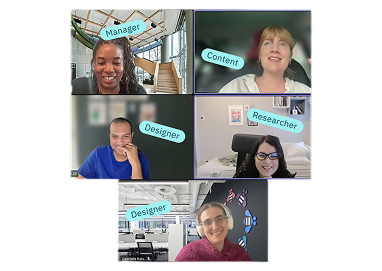
"I focused first on aligning the team on the right problem before designing solutions."
Before moving into solutions, I focused on aligning on the right problem and reducing risk early. I work iteratively — observing real constraints, reflecting on tradeoffs, and making focused decisions — while using clear alignment tools to keep the team moving in the same direction. This approach helped us navigate ambiguity early and move into execution with confidence.
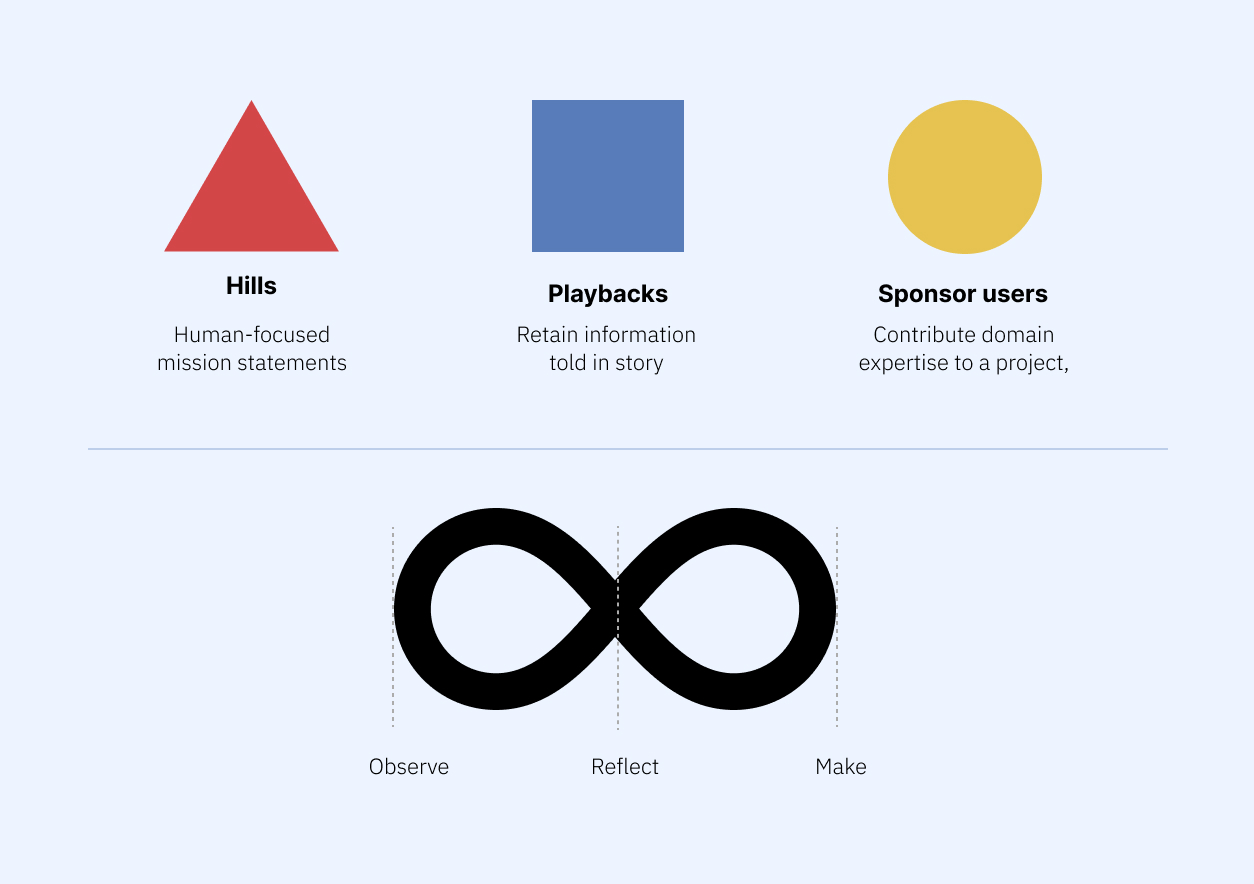
Hills
Clear, human-focused problem statements to align on what actually needed to change before committing to solutions.
Playbacks
Regular check-ins to reflect on progress, validate assumptions, and confirm we were solving the right problem, not just shipping features.
Sponsor users
Close collaboration with domain experts to ground design decisions in real identity and security constraints.
PAERT 03 - THE USER
Meet the admin
Getting close to the admin doing this work today, and mapping where it actually breaks down.
Meet Scott
Scott works in cybersecurity for a large retail company. He's the Access Management administrator, responsible for the day-to-day tasks that keep the company's infrastructure and apps secure, compliant, running, and useful to others. Most of his day is spent using IBM Verify.
But Scott has a difficult task: he often needs to write CEL to create custom identity attributes, which is like trying to communicate in a country where nobody speaks your language and the only dictionary he can find is incomplete. For Scott and everyone on his team, CEL scripting is really hard.
Understanding the current reality (As-Is)
Before exploring solutions, I focused on understanding how administrators currently create custom attributes and CEL logic in Verify — and where friction, delay, and risk actually occur.
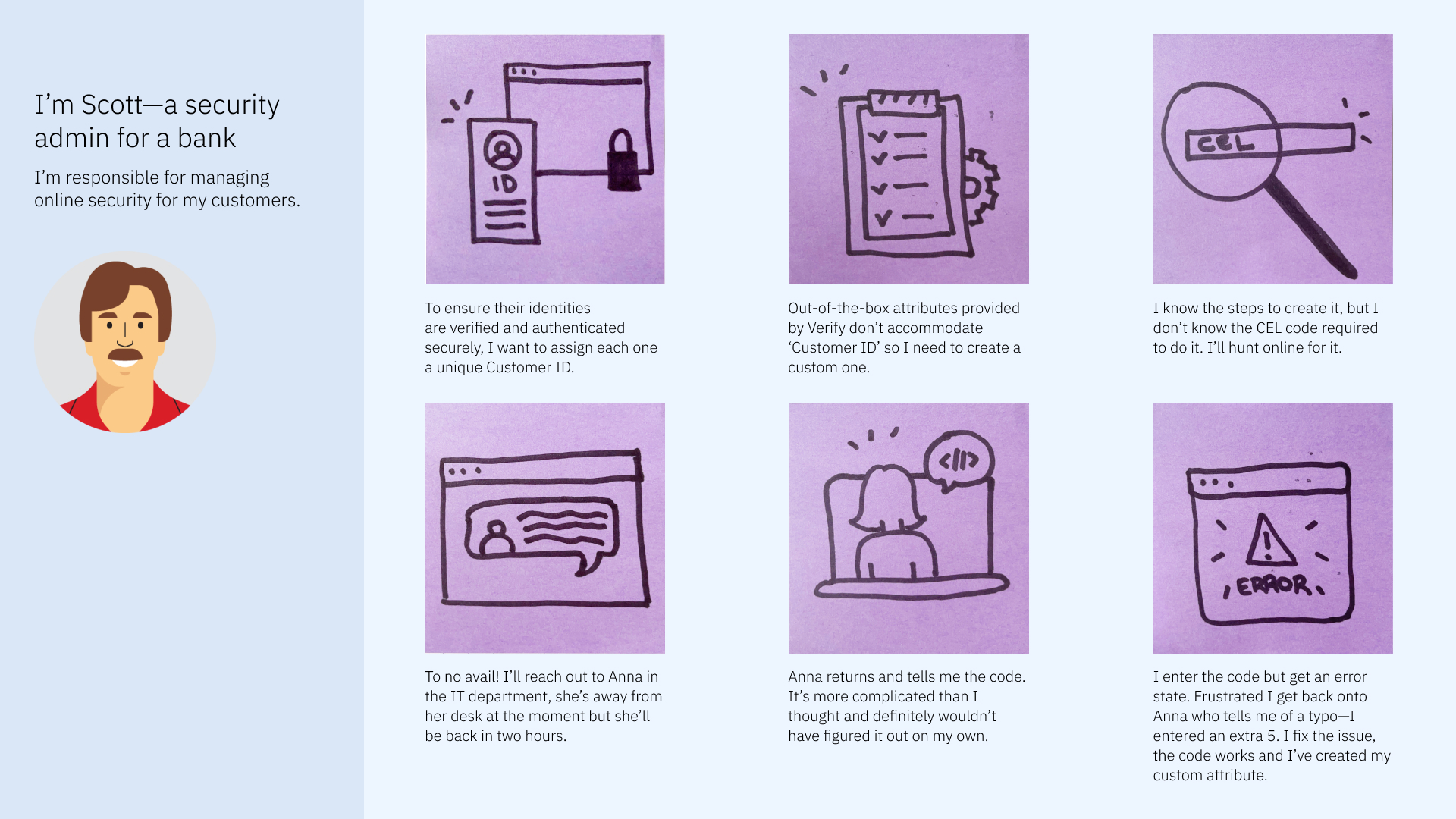
The cognitive load and the time taken to create a custom attribute has left me very frustrated. I feel pressure to learn CEL but there’s very little resources to do so and I don’t have the time! I’ve familiarity with Java and wish there was a way I could’ve simply used that. It would be really useful if something could’ve helped me create a custom attribute faster without having to run around looking for a code. — IBM Verify User
The problem behind the scenes
CEL is hard to learn because it's unique to IBM, with thin documentation and few examples. Admins fall back on old snippets, colleagues, or forums, and even a small mistake can break authentication or create security risk.
Poor Documentation
IBM's CEL documentation lacks code examples, making it difficult for users to understand and implement.
Steep Learning Curve
IBM's custom wrapper around CEL makes it a unique language to learn, so users aren't familiar with it and struggle to pick it up.
Too Many Workarounds
Users often end up searching for snippets from previous work, or asking colleagues and forums for help.
"Help identity administrators create correct CEL logic faster, without increasing cognitive load or introducing security risk."
That's the Hill we aligned on, broken into three goals that guide everything from here on:
01
Generate CEL faster
Automate the code itself, so admins spend less time hunting for snippets or waiting on colleagues.
02
Explain it in plain language
Make functions understandable, so users build fluency in CEL as they go, not just copy and paste.
03
Make it easy to debug
Surface and fix errors quickly, so a typo doesn't cost another trip back to IT.
PAERT 04 - TEXPLORING THE SOLUTION SPACE
Options & inspiration
Investigating how AI-assisted coding tools support generation, explanation, and correction, before defining a direction.
With a clear Hill in place, I looked at how AI-assisted creation works in other code and logic-heavy tools, not to copy patterns but to see where assistance helps and where it breaks trust.
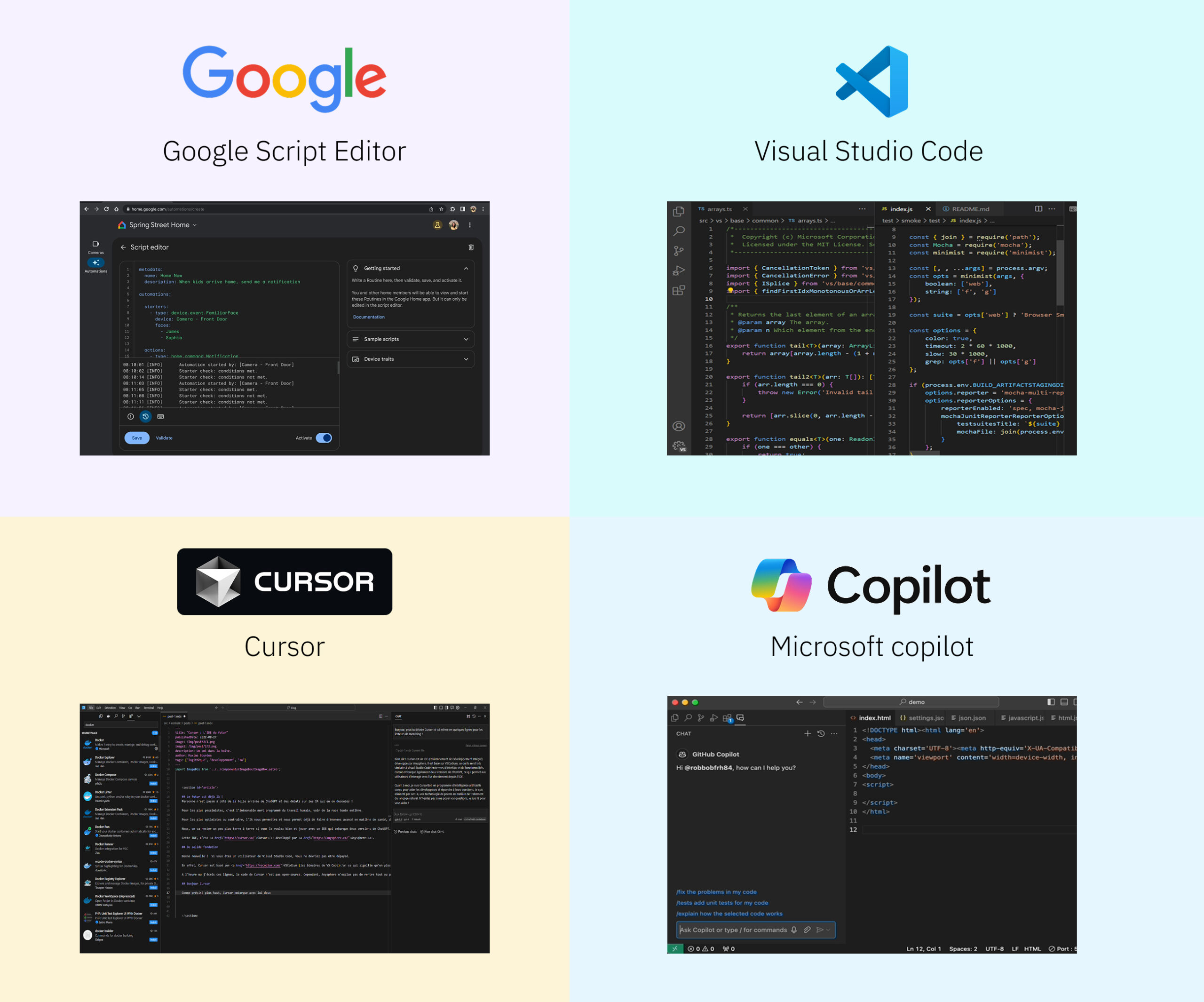
What we learned Across these tools, three recurring forms of assistance stood out:
- Generation: helping users get started or translate intent into code
- Explanation: making generated or existing logic understandable
- Fixing: supporting correction, refinement, and iteration
Notably, tools that leaned too heavily on generation without explanation or control often felt unpredictable or unsafe — especially in more complex or high-stakes workflows
PAERT 05 - IDEATION
From workshop chaos to four concepts
Sketching and stress-testing early interaction models before committing to one.
With the problem mapped and a clear Hill in place, I ran a workshop and sketched low-fidelity concepts. CEL has several entry points in Verify, but they all lead into just two surfaces, where I focused early exploration.
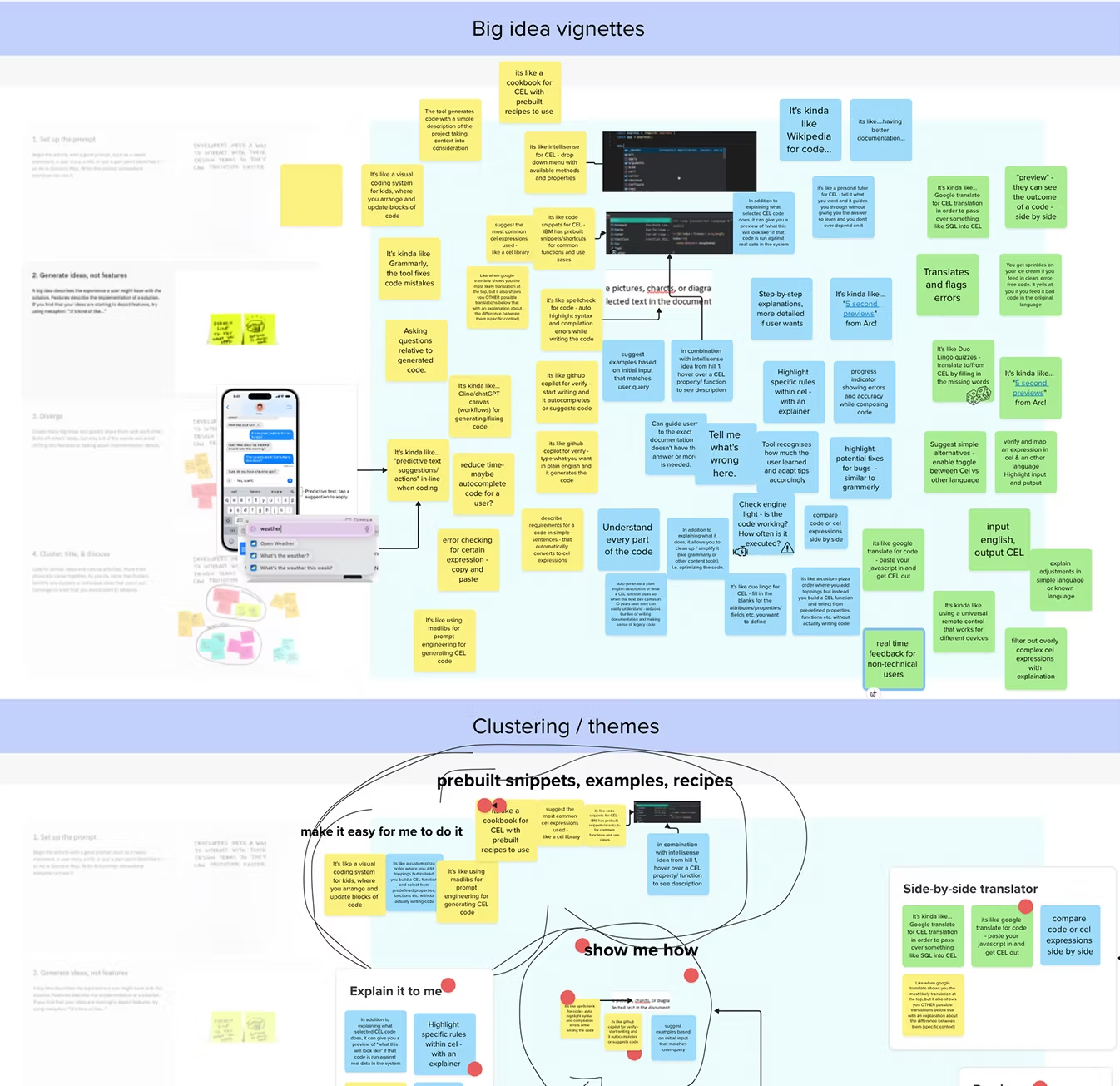
Clustering workshop ideas into early interaction themes: prebuilt snippets, "make it easy for me," "show me how," "explain it to me," and a side-by-side translator.
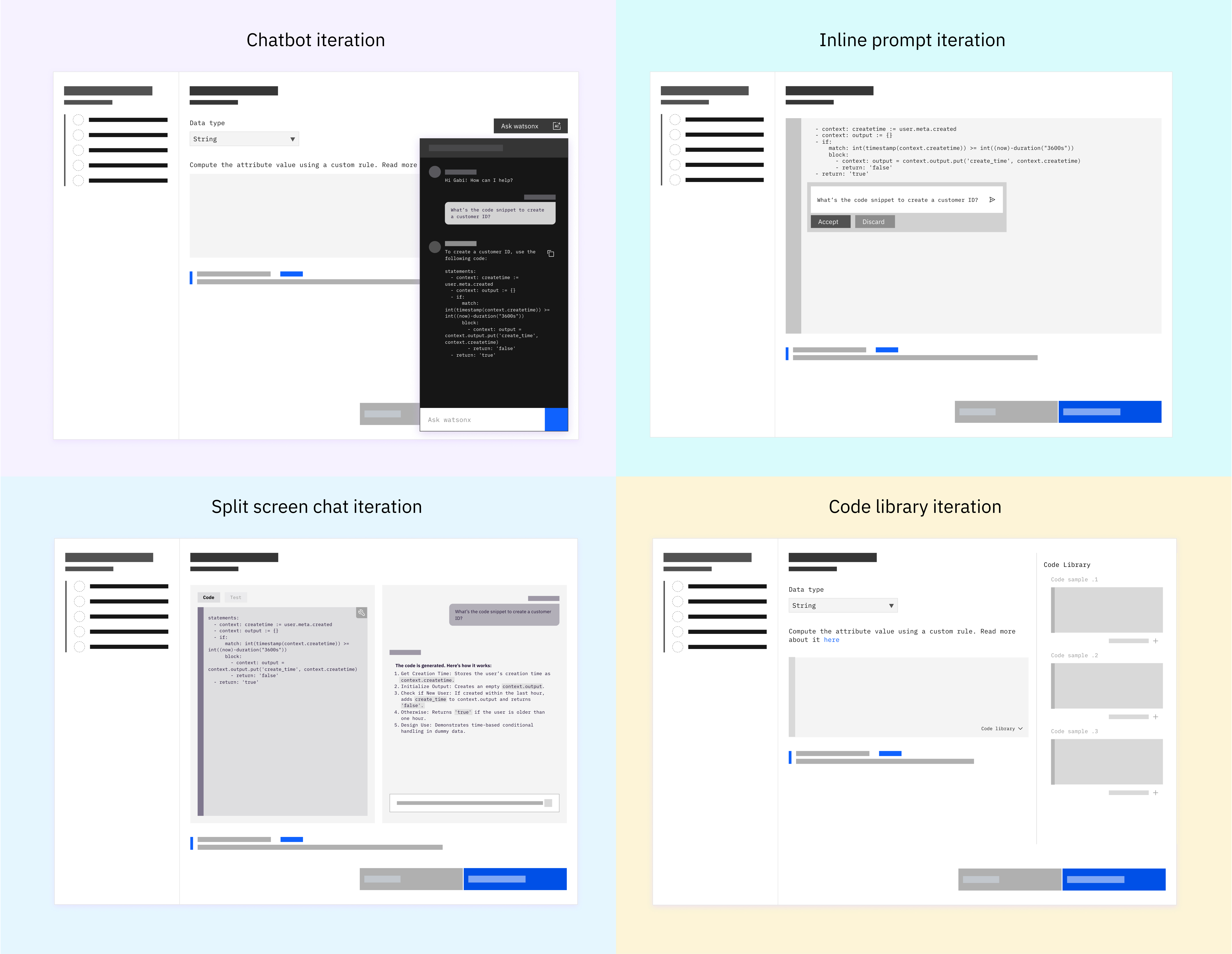
Each concept varied how and when AI appeared, and how much control users kept. The goal wasn't polish. It was to see which patterns felt supportive versus risky in a security-critical environment.
PAERT 06 - VALIDATION
User feedback that shaped the direction
Testing the four concepts with real admins to see what actually built trust.
Before converging on a direction, I validated early concepts with identity admins, not to test UI polish but whether the AI assistance felt useful, trustworthy, and appropriate for a security-critical workflow.
Research objectives:
- How do users (or user proxies) respond to early solution concepts?
- Assess the perceived value of multiple lo-fi concepts with Verify users / internal SMEs
- Understand how the concepts fit real workflows, and surface what's missing
A
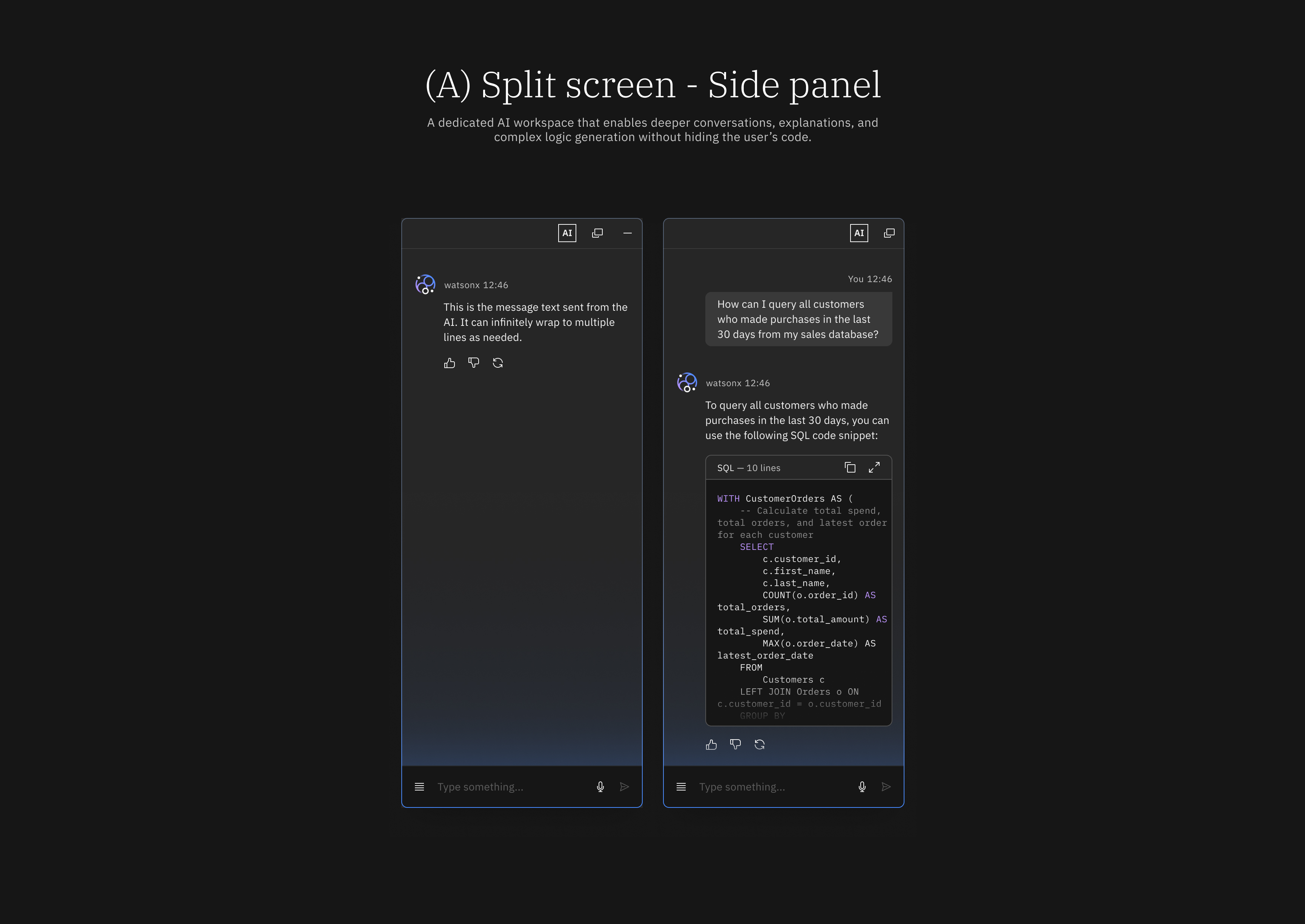
Split screen
Offers a clear UX for every need: generate, chat, debug. Tailored to preference, and not distracting.
"It gave me the flexibility of having my window and not being distracted by a chat bot, while also having it when I need it." — Particpant .1
B
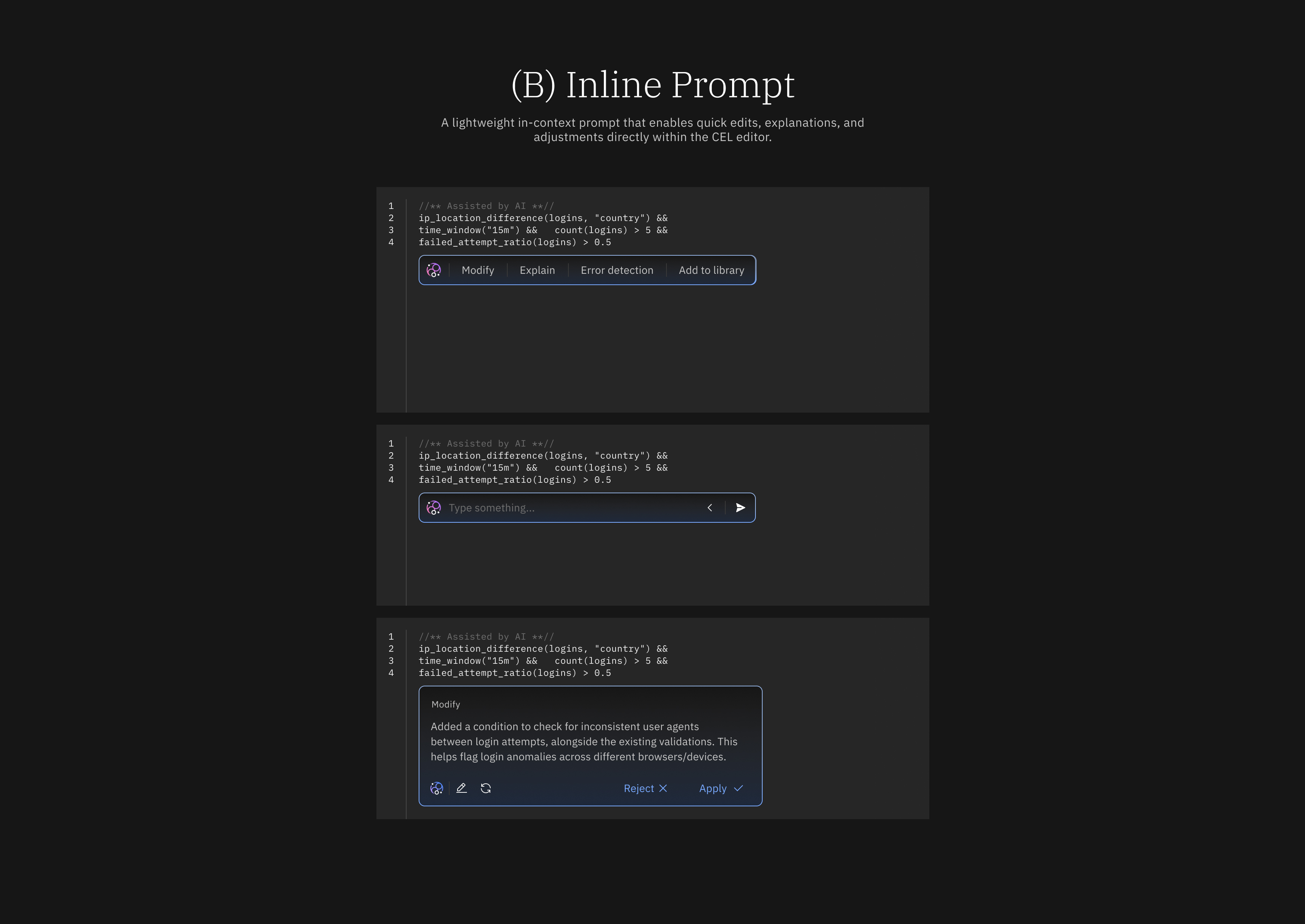
Inline prompt
Doesn't disrupt the workflow. Quick, boosts efficiency, feels like a helpful shortcut.
"This helps me out without interrupting my flow." — Particpant .2
C
Chat bot
A classic generative-AI pattern that gives the feeling of an assistant.
"I love the idea of the chat bot. It feels like I'm engaging with gen AI." — Particpant .3
D
Code library
Helpful to save, retrieve, and share snippets. No need to leave the UI for documentation.
"Combining the code library with the chatbot will add significant value." — Particpant .4
Split-screen increased confidence
Users preferred keeping generated CEL visible and editable alongside explanations.
Inline / chat-only felt limited
Fast and lightweight, but often lacked sufficient context for complex logic.
PAERT 06 - THE DECISION
How we chose the final design
Combining the strongest parts of each concept into one direction.
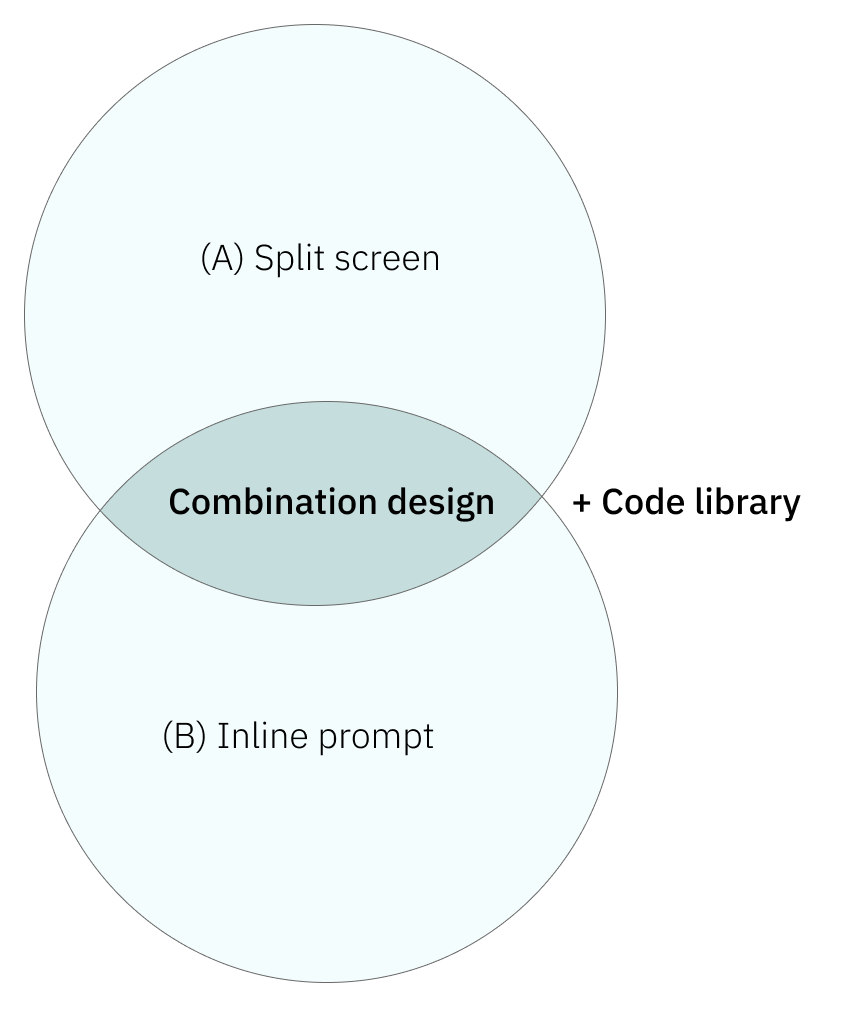
The goal wasn't to pick one interaction pattern, but to combine strengths while avoiding weaknesses, blending split screen and inline prompting and backing it with a reusable code library.
- With a dual panel, the split screen offers clarity and space, so AI complements the workflow instead of obstructing it.
- The inline prompt offers quick action for when the full chat experience isn't required.
- All participants valued the library as a companion to generative AI. It adds ingenuity to the primary solution.
PAERT 07 - HIGH - FIDELITY DESIGN
Generate, explain, and fix
Turning the chosen direction into production-ready UI.
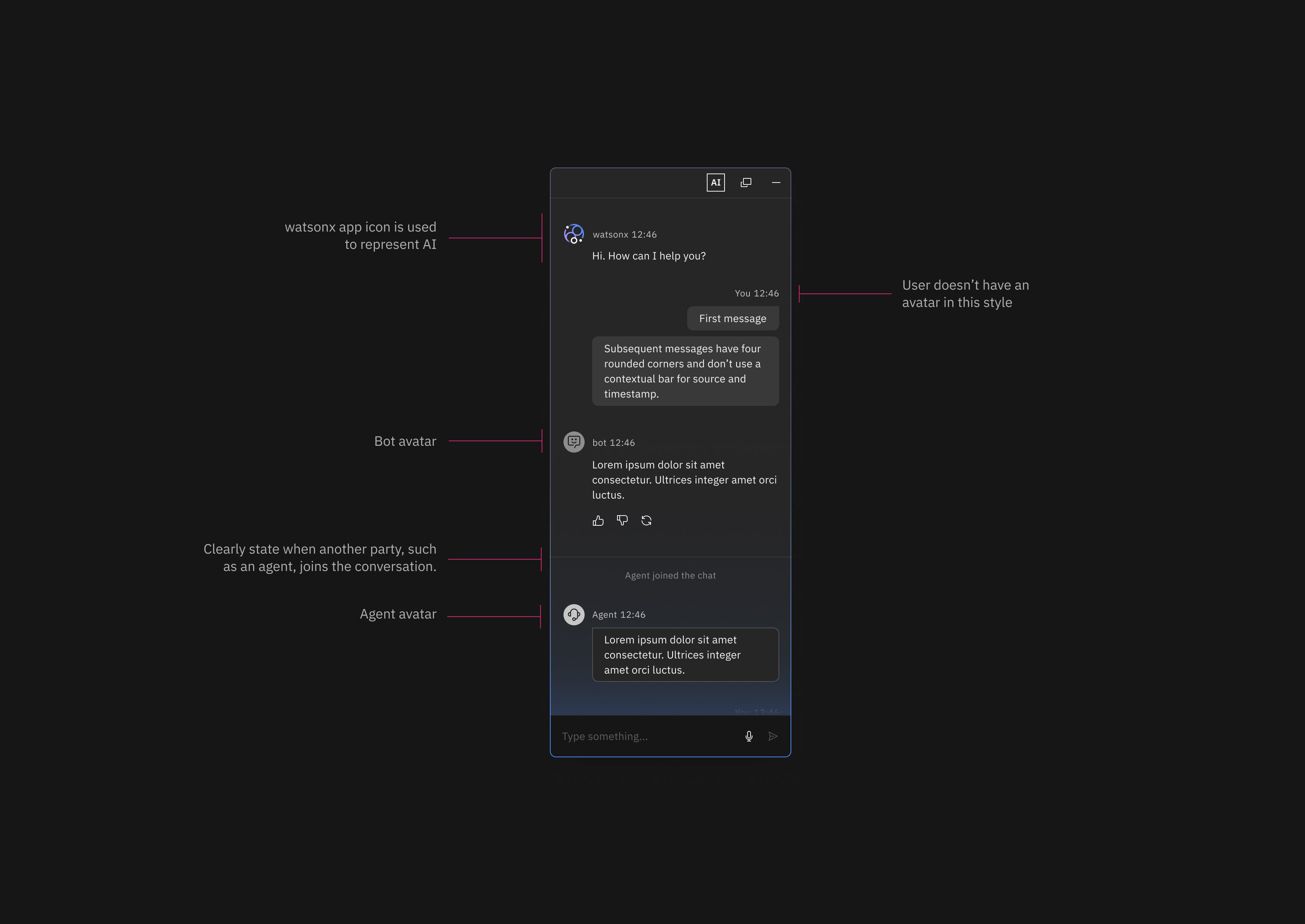
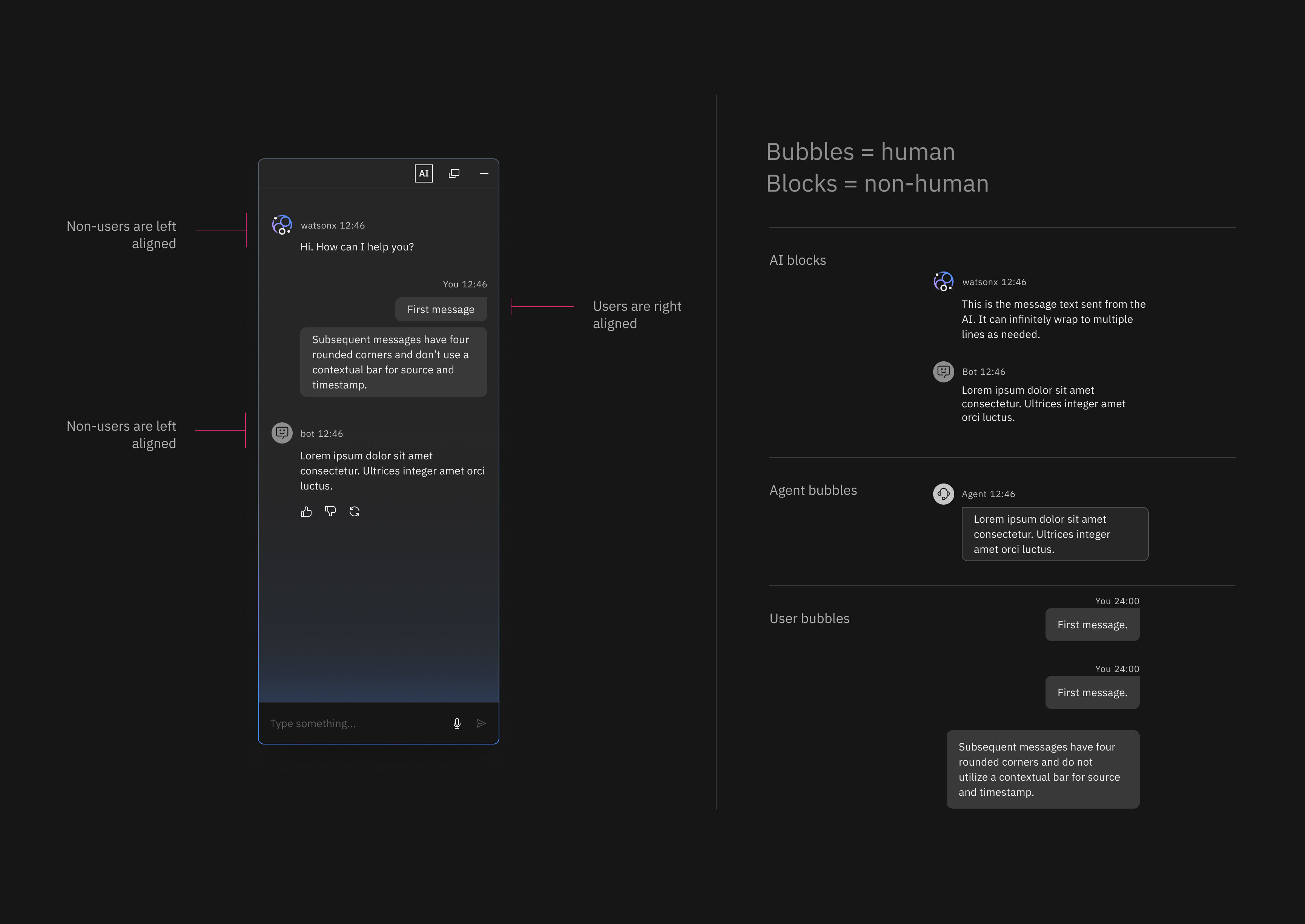
The final experience adds AI assistance to Verify through three surfaces (a chat panel, an inline prompt, and a reusable code library), all built around one goal: helping users create, understand, and refine CEL logic without losing control or trust. I translated this into high-fidelity UI aligned with IBM's Carbon Design System, distinguishing AI (watsonx), the user, and human agents through icons, message styles, and labels.
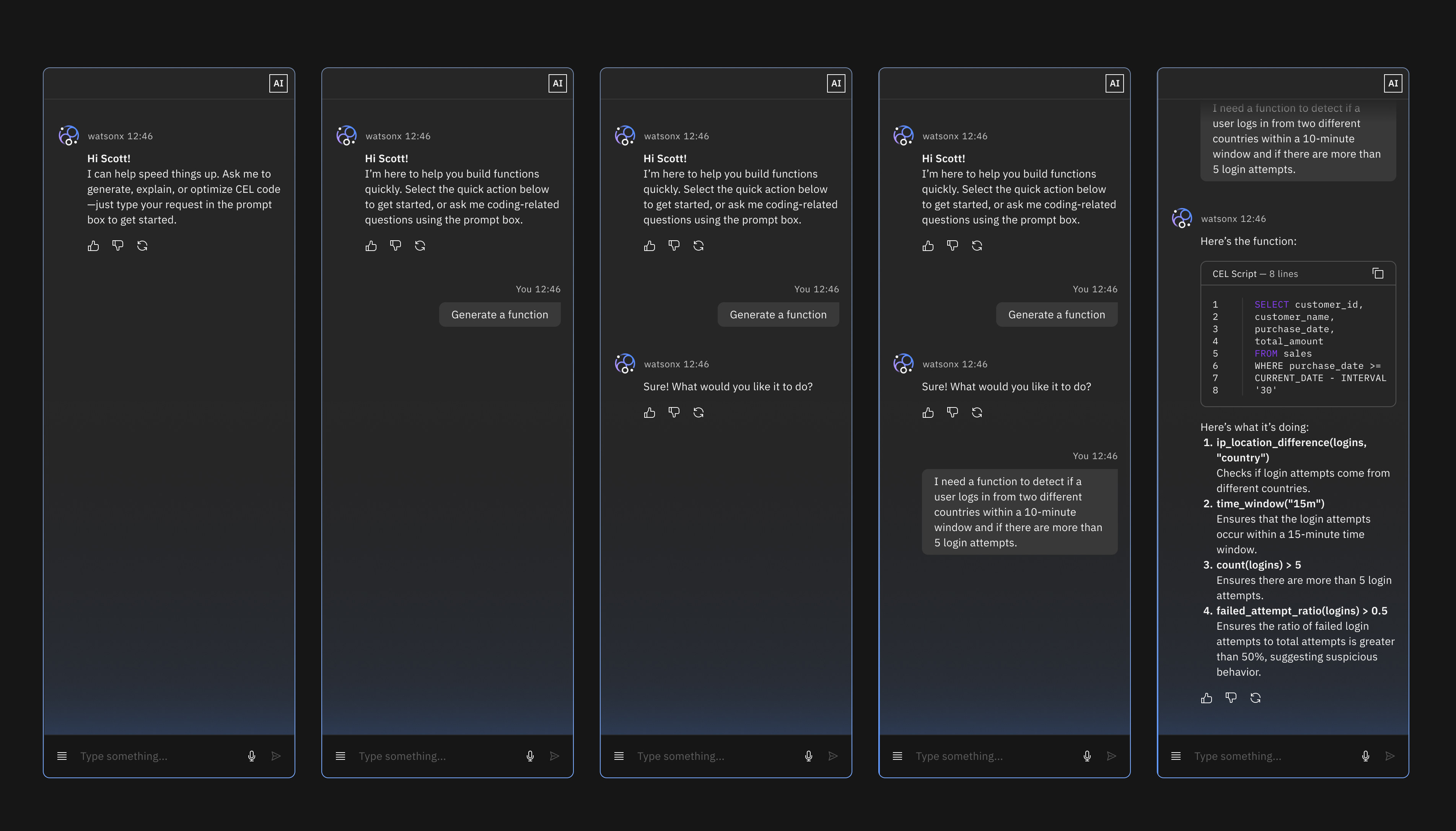
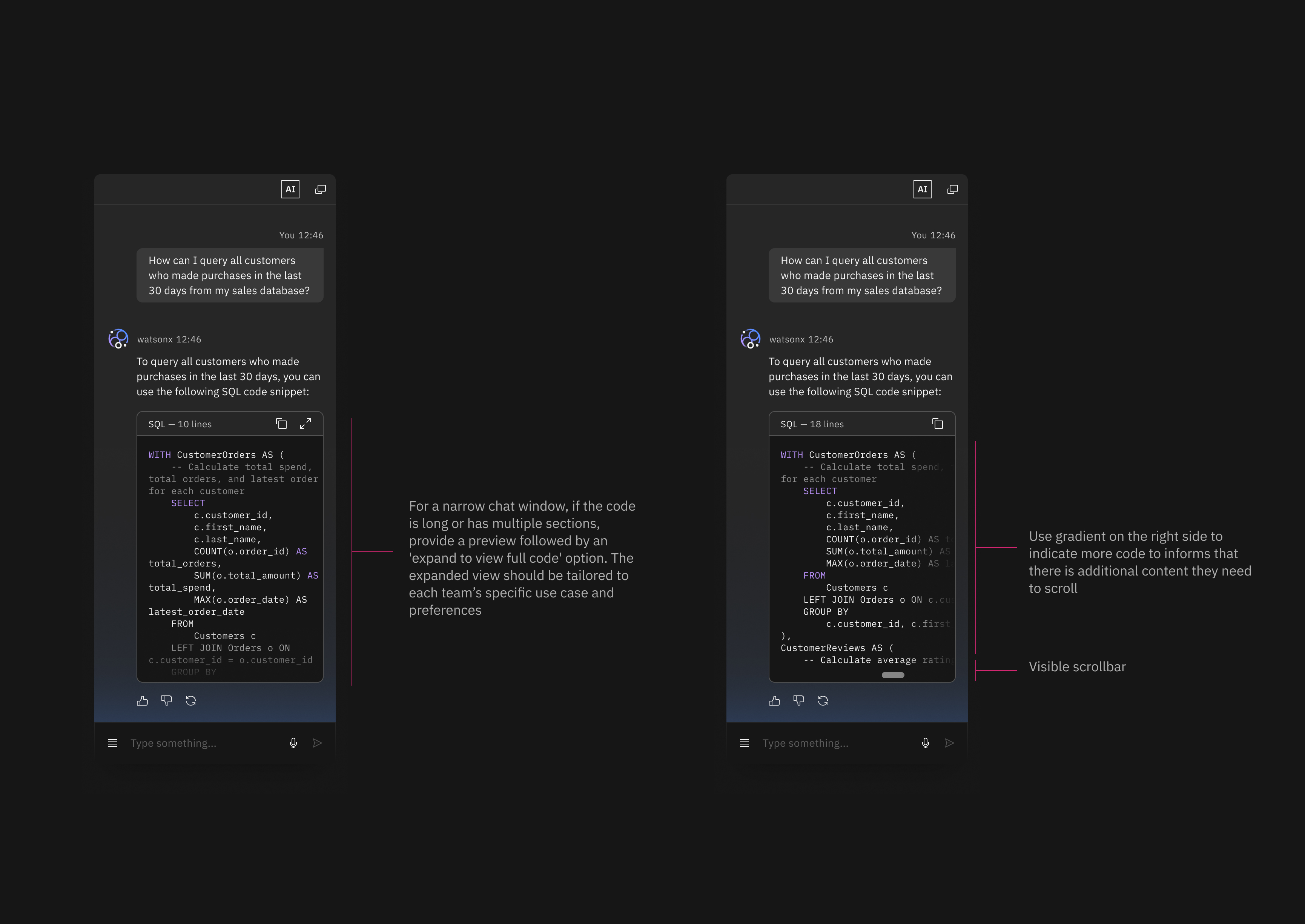
The chat panel provides a dedicated space for more complex interactions, such as generating CEL logic, asking for explanations, or fixing existing expressions. I translated the interaction concepts into high-fidelity UI aligned with IBM’s Carbon Design System, defining the detailed behavior and structure of the AI chat experience. The design clarifies different participants in the conversation by distinguishing AI (Watsonx), the user, and human agents through icons, message styles, and labels.
Inline prompt- Fast, lightweight actions
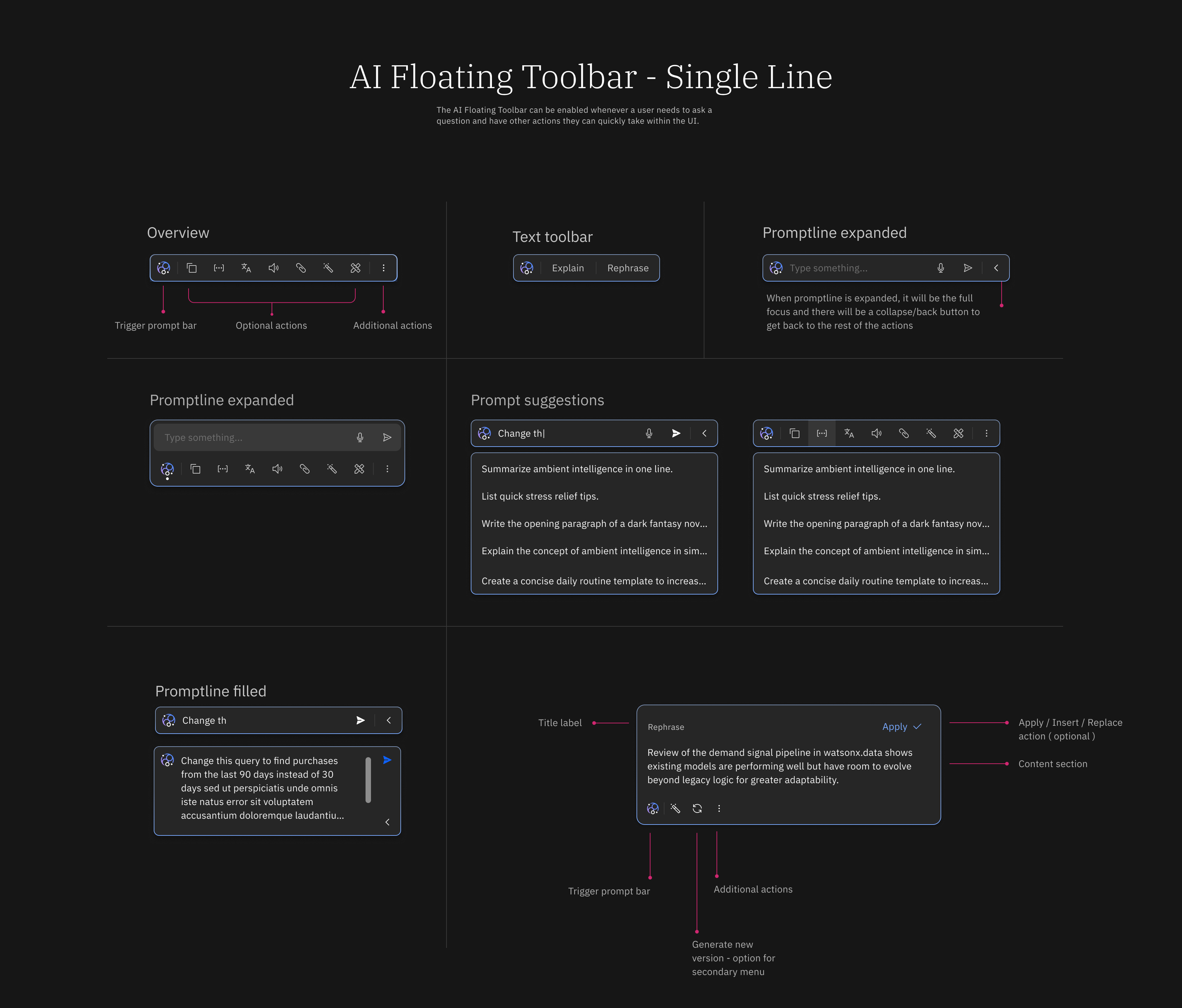
The inline prompt offers a quicker, more lightweight way to access assistance when a full chat interaction isn’t required. Inline prompts allow users to move quickly while still benefiting from AI support.
I designed the inline prompt as a lightweight entry point for AI assistance directly within the CEL authoring workflow. This interaction allows users to request quick transformations or adjustments without opening the full chat interface, supporting faster, focused actions. By embedding the prompt in context, the design minimizes disruption while enabling users to benefit from AI assistance for simple tasks, small edits, or repetitive operations.
Final Experience AI Assistance for CEL Authoring
After exploring multiple interaction models and validating them with users, the final design brings AI assistance into the CEL authoring workflow through two complementary surfaces: a split-screen side panel and an inline prompt.
How this resolves the original tension
This solution resolves the tension between speed and trust by treating AI as adaptive support rather than a single, authoritative feature. By distributing assistance across a chat panel, inline prompts, and a reusable code library, users can choose the level of help they need without losing visibility, control, or accountability. Logic is never hidden, understanding is always accessible, and correction is an expected part of the workflow. As a result, AI accelerates CEL creation while reinforcing confidence in what gets deployed — supporting faster outcomes without compromising the integrity required in identity and security systems.